100+ Mom SVG Designs: A Complete Crafting Resource
There’s a unique satisfaction in creating something by hand—especially when it’s for someone you love. For crafters, small business owners, and anyone who owns a cutting machine, the hunt for fresh, high-quality designs is constant. A generic store-bought shirt can’t compare to a custom tee featuring a heartfelt quote or a playful “mama” graphic. That’s where a well-curated design bundle becomes an essential tool. It’s not just a collection of files; it’s a solution for turning ideas into tangible, beautiful items quickly and professionally.
More Than Just Files: A Foundation for Creative Projects
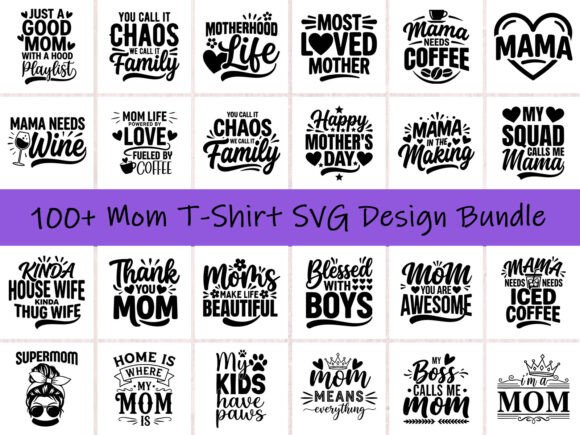
This extensive collection is built around a central theme: celebrating mom. But its versatility is what truly stands out. The bundle includes over 100 unique designs provided in SVG, PNG (with transparent backgrounds), and EPS formats. This multi-format approach ensures compatibility with nearly every popular design software and cutting machine, from Cricut and Silhouette Cameo to ScanNCut. The designs focus on stylish typography and trendy graphics, covering a wide range of sub-themes like “coffee mom” aesthetics, family-centric quotes, and bold “mama” statements. Each file is optimized for clean cuts and vibrant prints, which is crucial for achieving a professional result on apparel, mugs, tote bags, stickers, and other merchandise.
For a small business owner, this kind of asset is a time-saver and a profit-driver. Instead of spending hours designing from scratch or purchasing individual files for each new product line, you have a ready-made library. This allows you to rapidly prototype new shirt designs for your Etsy shop, create seasonal Mother’s Day inventory, or offer a broader range of products in your print-on-demand store. The commercial license included means you can use these designs to create and sell physical products without worrying about additional fees or legal complexities.
Practical Applications for Brand and Business
Think beyond the basic t-shirt. While that’s a primary use, the real power of this bundle lies in its adaptability across various branding and marketing materials. Here’s how you can leverage these designs to build a cohesive and appealing brand presence:
- Apparel & Merchandise: This is the core use. Create a full “Mom Life” collection featuring different quotes and styles. Offer matching family shirts for holidays or newborn photoshoots. Design cozy hoodies, tank tops, and baby onesies.
- Accessories & Home Goods: The SVG files are perfect for vinyl decals on coffee mugs, water bottles, and car windows. Use the PNG files for sublimation on tote bags, pillows, and blankets. Create custom stickers for planners, laptops, or as bonus gifts with orders.
- Digital Presence & Marketing: Use the graphics to create engaging social media posts for Mother’s Day promotions or everyday “mom life” content. Incorporate the designs into email newsletter headers, website banners, or blog post graphics to add a personal, relatable touch. The high-resolution PNGs are ideal for digital use.
- Packaging & Unboxing Experience: Elevate your customer experience. Print a design onto tissue paper, use a thank-you card featuring a subtle mom quote, or create a branded sticker to seal your packages. This small detail builds brand recognition and shows attention to detail.
- Physical Print Materials: Design flyers, posters, or invitations for local mom groups, family events, or boutique sales. The clean vector files (SVG/EPS) ensure your prints are sharp and professional, whether at a small or large scale.
Choosing the Right Design for Your Project
With over 100 options, the key is to be intentional. Start by considering your target audience and the message you want to convey. A design that works for a trendy, minimalist mom blog might differ from one aimed at a grandmother who loves classic styles. Review the bundle’s contents and sort the designs into categories based on their visual weight, font style, and tone.
Typography Matters: Pay close attention to the font styles within the designs. Are they bold, sans-serif statements that command attention? Are they elegant script fonts that feel personal and handwritten? Are they playful, rounded typefaces that evoke warmth? Matching the typographic personality to your product and brand voice is critical. A “Mama Needs Coffee” design in a strong, blocky font feels different than one in a flowing cursive.
Color and Composition: While the files are often single-color for easy cutting, think about the final application. How will the design look on a black t-shirt versus a white one? Will you use heat transfer vinyl (HTV) in multiple colors, or stick to a single shade? The PNG files with transparent backgrounds make it simple to mock up designs on different colored blanks before you commit to cutting.
Pairing and Layout: Don’t be afraid to combine elements. You might use a main quote design on the front of a shirt and a smaller, complementary graphic (like a heart or a coffee cup icon) on the sleeve. For a family matching set, you could use a central design for the mom’s shirt and a simplified version or a related quote for the kids’ shirts. This creates a cohesive collection rather than a series of unrelated items.
Integrating Designs into a Larger Workflow
For the entrepreneur, efficiency is everything. Here’s how to make this bundle work seamlessly within your production process:
- File Management: Download and organize the files immediately. Create a clear folder structure on your computer—perhaps by theme (Mother’s Day, Everyday Mom, Family) or by file type (SVG for cutting, PNG for mockups). This saves immense time later.
- Software Preparation: Import the SVG files directly into your cutting machine’s software (Cricut Design Space, Silhouette Studio). The paths should be clean and ready to cut. For any design work in Adobe Illustrator or Inkscape, the EPS files offer the most flexibility for editing colors or isolating elements.
- Test Cutting: Always perform a test cut on a scrap piece of vinyl or material. This ensures your machine settings (blade depth, pressure, speed) are correct for the design’s intricacy. Fine script fonts may require different settings than bold block letters.
- Mockup Creation: Use the transparent PNG files to create professional-looking product mockups. Place the design onto a blank shirt template in a design program or use a mockup generator service. These images are vital for your online listings, as they help customers visualize the final product.
- Batch Production: Once your designs are finalized and tested, you can cut multiple designs in one session. Arrange them efficiently on your cutting mat to minimize material waste. This is especially useful when fulfilling multiple orders or building inventory for a craft fair.
In the end, a resource like this is about empowerment. It removes the technical and creative barriers that can slow down a crafter or business owner. It provides a foundation of high-quality, ready-to-use art that you can adapt, personalize, and build upon. Whether you’re making a one-of-a-kind gift for your own mother or launching a full product line for the upcoming holiday season, having a versatile and comprehensive design library at your fingertips transforms the creative process from daunting to delightful. It allows you to focus on what you do best: making beautiful, meaningful things.